Instant project switching
Alt/Option-Tab between projects. Your agents and terminals are there, right where you left them.
Agentic Development Environment
ADE is the new IDE. RemADE is built from the ground up for humans and agents working together.
Switch between agents and terminals like you switch thoughts. Jump between projects without breaking flow.
Alt/Option-Tab between projects. Your agents and terminals are there, right where you left them.
Glide between terminals. No tab hunting, no context loss.
Hover a terminal to type in it. Hover a pane to scroll it. Fewer clicks. More flow.
The UI seamlessly, spatially adjusts to where you're focused.
Jot a thought, paste a spec, drop a TODO. Notes live in the environment, and your agents can read them too.
Cmd-L. No more searching for your app in a sea of tabs.
Open remote projects over SSH with automatic tunneling.
A visual and (optionally) audible notification the moment your agent finishes or needs your input. No more checking back to find it idling for 30 mins.
Bring Your Own Agent.
B · Y · O · A
Claude Code. Codex. Gemini. Kiro. OpenCode. You name it. We build the environment, you bring the intelligence. Swap between them, run them side by side, let them talk to each other.
Agent-agnostic. Developer-native.
When you restart RemADE, your terminals, and your agent conversations, come back the way you left them.
Close the app, reopen it: your terminals are right where you left them.
Computer restart? Pick up where you and your agent left off.
For supported agents
Branches, commits, and diffs. Always one glance away.
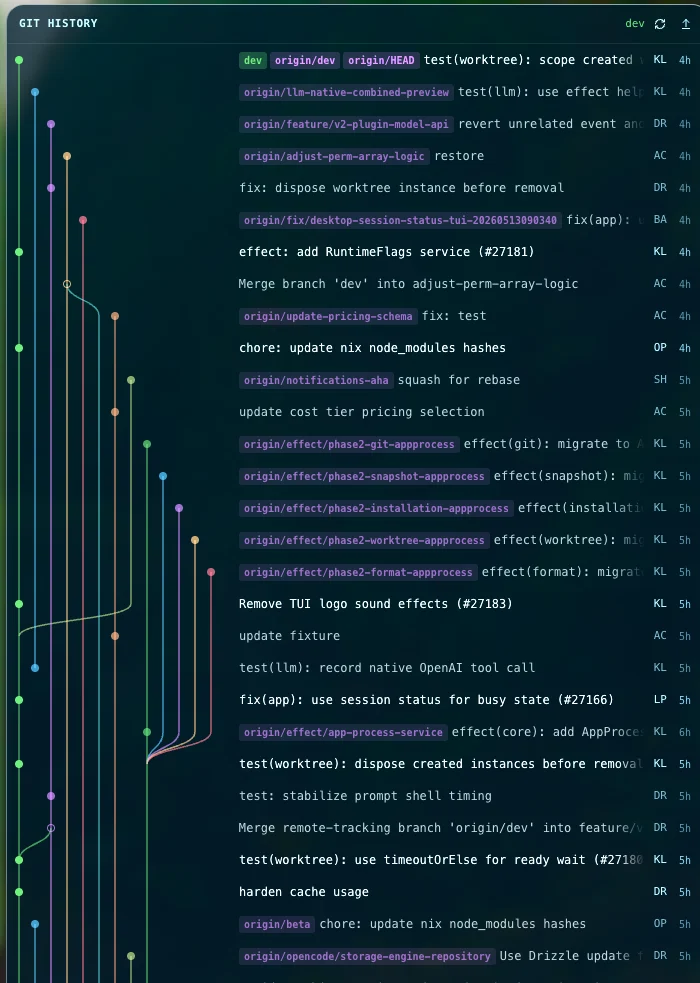
A dedicated git tree shows every commit, branch, and merge. Browse history without leaving the editor.
See exactly what has changed. Line by line, side by side.
Privacy isn't a setting. It's the default.
We never see your code or files.
Your agent conversations go straight to your agent's provider. We don't proxy them.
I've been using RemADE for about three months and I genuinely can't go back to traditional IDEs.
I came up in VS Code and used it for years, but no matter how much AI tooling gets bolted on, the underlying structure was built for a different era of development. RemADE is built for the way I actually work now: an environment designed around having an AI companion through the entire coding process.
I finally found an IDE that lets me move as fluidly as I always imagined.
I work like a cephalopod, many tentacles, many threads at once, and RemADE is the first IDE that flows with me.
RemADE is simple, intuitive, and flexible and has streamlined my workflow.
It elegantly switches between terminals and files with the minimum number of keystrokes, enabling seamless work across multiple projects. The fact I don't have to continually resize terminal windows to see the files was also a huge thing in the beginning.
Same RemADE, two licenses. Every feature is unlocked in both — the license is about how you're using it, not what you get.
Free, forever
For learning, hobby projects, and personal use. Every feature unlocked, no license required.
DownloadBilled annually at $60
For use at a company, on client work, or revenue-generating projects. Same software, fully licensed for commercial use. Supports continued development.
Personal is free for personal use. Professional is for work: at a company, on client projects, or anything revenue-generating. Same RemADE, just licensed for the use.
RemADE vs. the tools you're using today.
| Feature | RemADE | VS Code | Warp & macOS Terminal |
|---|---|---|---|
| AI agents in the terminal | ✓ | ✓ | ✓ |
| Instant project switching | ✓ | ○ | ✗ |
| Navigate dozens of terminals and agents | ✓ | ✗ | ✗ |
| Agents + terminals live through app restart | ✓ | ✗ | ✗ |
| Automatic agent restore after computer crash | ✓ | ✗ | ✗ |
| Don't leave your agent waiting | ✓ | ○ | ✗ |
| Focus adaptive UI | ✓ | ✗ | ✗ |
| Translucent, tinted windows | ✓ | ✗ | ✓ |
| Quick notes | ✓ | ○ | ✗ |
| Launch your app's tab in a keystroke | ✓ | ✗ | ✗ |
| SSH remote development | ✓ | ○ | ○ |
| File explorer | ✓ | ✓ | ✗ |
| File changes view | ✓ | ✓ | ✗ |
| Git tree view | ✓ | ○ | ✗ |
| Agent traffic isn't proxied through us | ✓ | ○ | ○ |
✓ built in ○ with 3rd-party plugins ✗ not supported
The environment gets out of the way so you and your agents can do the work.